
Advanced Features
Set Up Cal.com In Chatbots
Embed a Cal.com appointment scheduler directly within your chatbot widget or iframe to simplify the appointment scheduling process.
Setup Process
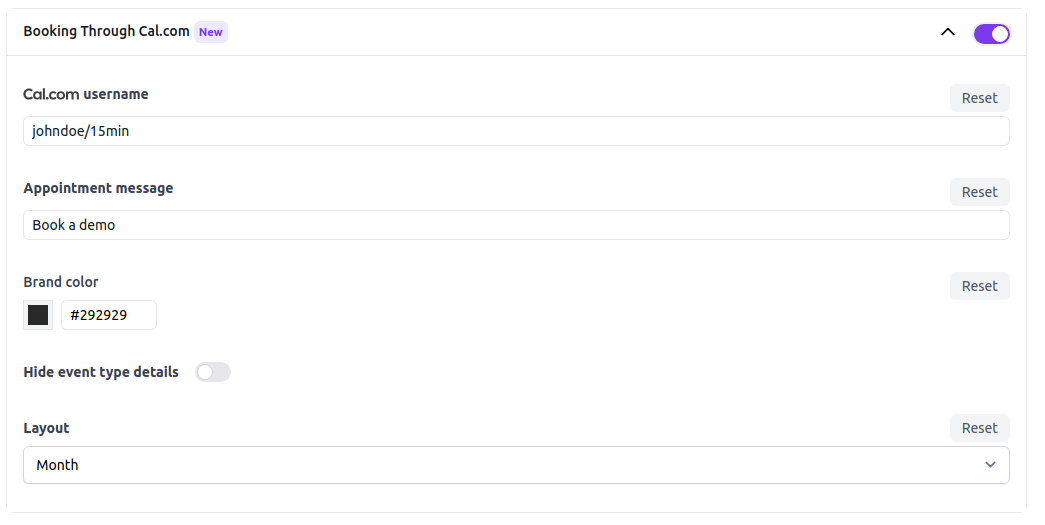
Integration your chatbot's Cal.com appointment scheduling features by navigating to the following URL: https://www.chat-data.com/chatbot/{chatbotId}/settings/appointments. On this page, you can set up your Cal.com appointments using the following parameters:
- Turn on Cal.com: Activating this setting will display the Cal.com appointment scheduler as the initial interaction option at the top of the chatbot when embedded in a website as a widget or iframe.
- Cal.com username: This is the username associated with your Cal.com account, you do not need the include the 'https://cal.com/' part of the URL. A good example is
johndoeorjohndoe/15min. - Appointment message: This is the custom message displayed on the appointment button.
- Brand color: This is the color of the selected date in the Cal.com calendar in light mode. Currently, we only support light mode because the dark mode display of the calendar interface via Cal.com does not work in all browsers.
- Hide event type details: This is a boolean value that hides the event type details in the Cal.com calendar.
- Layout: This is the layout of the Cal.com calendar, you can choose between
Month,WeeklyandColumn.
Frequently Asked Questions
What happens when I turn on Cal.com in the chatbot?
Enabling Cal.com makes the appointment scheduler appear as the initial option at the top of the chatbot when the chatbot is embedded as a widget or iframe.
What value should I enter for the Cal.com username field?
You should enter only the Cal.com username or path segment, such as johndoe or johndoe/15min, without including the https://cal.com/ part.
Which appearance settings can I customize for the embedded Cal.com scheduler?
A custom appointment button message, brand color for selected dates, an option to hide event type details, and a layout choice of Month, Weekly, or Column.
Does the Cal.com embed support dark mode?
No. only light mode is supported because Cal.com dark mode does not work consistently across browsers in this embed setup.